Simprosys Google Shopping Feed
Pre-Installation & Setup

Initial App Configuration
Product Submission Controls
Product Attributes and Optimization
Automated Feed Rules
Troubleshooting & Issue Fixes
Advanced Setup Made Easy
Google Merchant Center Setup
Tracking Tags Setup (Google Ads & Google Analytics 4)
Google Ads & Campaign Setup
Multi-Country & Market Setup
Promotions and Discounts
Microsoft Advertising Integration
Meta (Facebook) Integration
Pinterest Integration


Smart Pricing Made Easy: Google AI-Powered Sale Price Suggestions
Apr 03, 2026
Have you ever wondered if your prices are too high? Too low? Just right? You're not alone. Pricing is one of the biggest levers you have to get more sales, but it's also one of the hardest decisions to make.
If your pricing isn’t aligned, you risk losing potential customers or cutting into your margins. Get it right, and your products get more clicks, more conversions, and more revenue.
That's exactly what Google's AI-Powered Sale Price Suggestions does. It analyzes how your products sell, tracks what competitors are charging, and tells you the exact prices that could help your business grow.
Why Should You Use This Feature?
- Stay Competitive: Compare your prices with competitors and avoid losing sales due to higher pricing.
- Save Time: No more manual price monitoring. Google does the heavy lifting for you.
- Increase Sales: Get data-backed recommendations to attract more customers and boost conversions.
- Stay in Control: These are suggestions, not requirements. You can choose whether to apply or not.
How Does It Work?
It’s a three-stage process that turns raw performance data into clear, actionable pricing strategies.
1: Data Collection
Google looks at how your products performed over the last 7 days—like clicks, conversions, and pricing-and compares them with similar products in the market to identify where sale price suggestions could help improve performance.
2: Smart Analysis
Google runs advanced AI simulations on products that are most likely to benefit from a price change, based on their performance and how sensitive they are to pricing.
3: Recommendations
After running advanced simulations, Google suggests optimized prices along with expected impact on clicks, conversions, and how each price change could influence performance.
Getting Started: What You Need
To start receiving sale price suggestions, you need to have:
- A Google Merchant Center account with successfully submitted and approved products.
- Google Ads Conversion tracking enabled
- Product identifiers (GTINs/barcodes) to improve accuracy
- Customer purchase data (cart data) to make suggestions more relevant
- Cost of Goods Sold (COGS) and Minimum Price (auto_pricing_min_price) to protect your margins
How to Use Price Suggestions
Step 1: If price suggestions are available from Google, a recommendation bar will appear on the “Manage Product” page of the app. You can click the “View Price Suggestion” button to filter and view all products with a sale price.
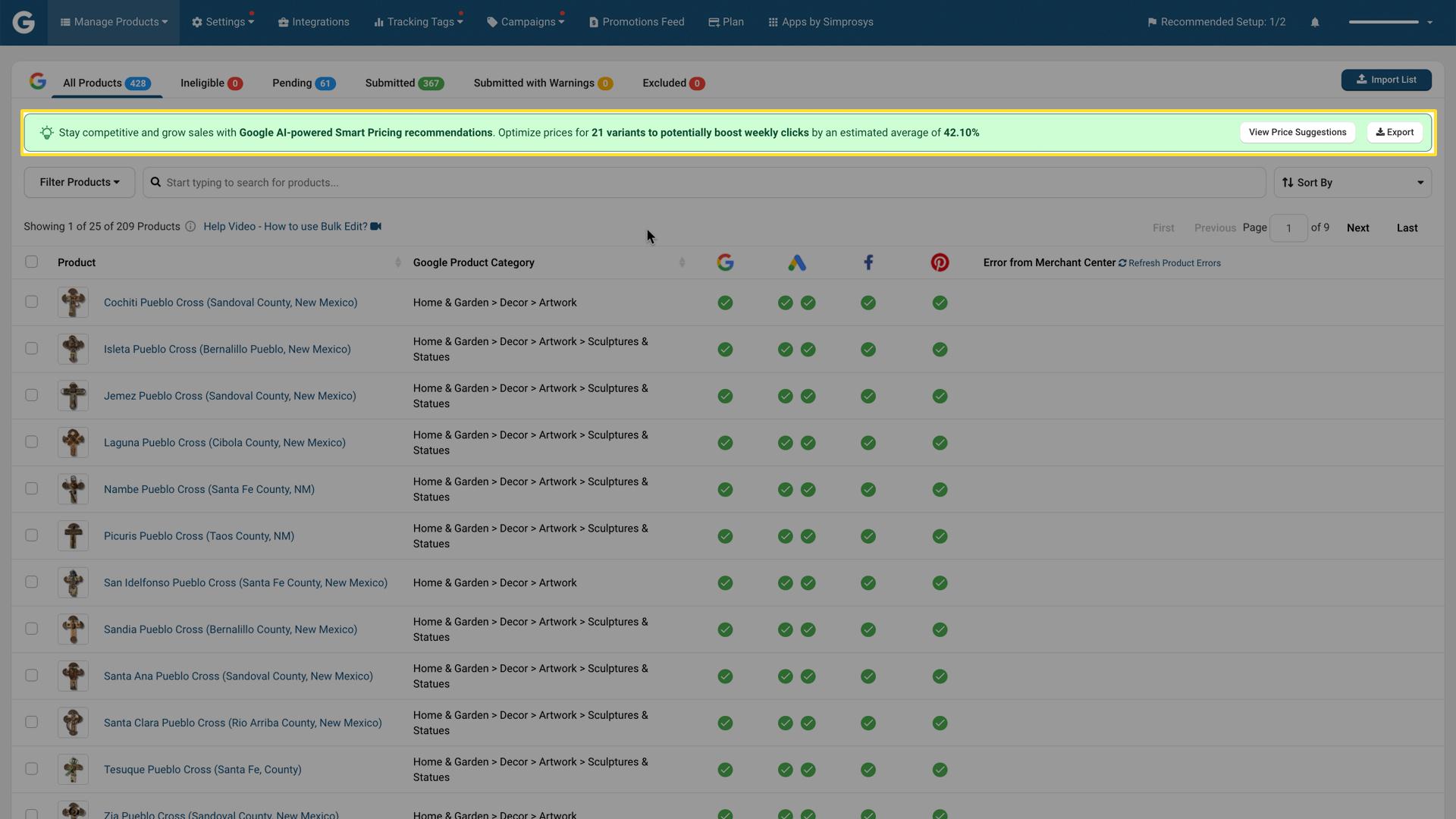
Step 2 - Review the details
Hover over the green bulb icon next to any product title to see details for that specific item. A pop-up will show you:
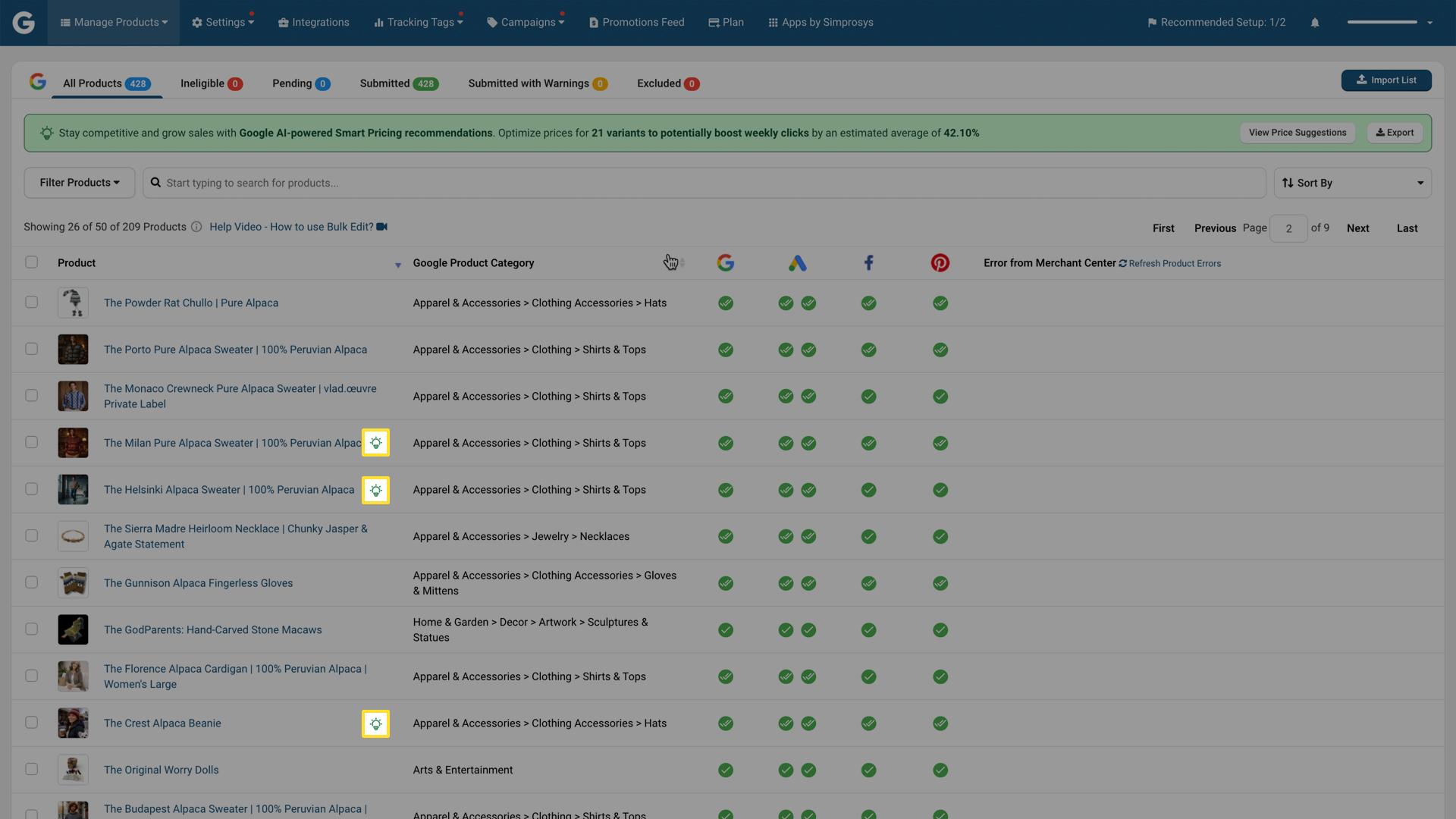
- Your Current Price: What the product is currently priced at
- Suggested Price: What Google recommends
- Discount Percentage: How much lower the suggestion is.
- Performance Impact: Predicted changes in impressions (views), clicks, and conversions
- Effectiveness: How much the product will be impacted (High, Medium, or Low)
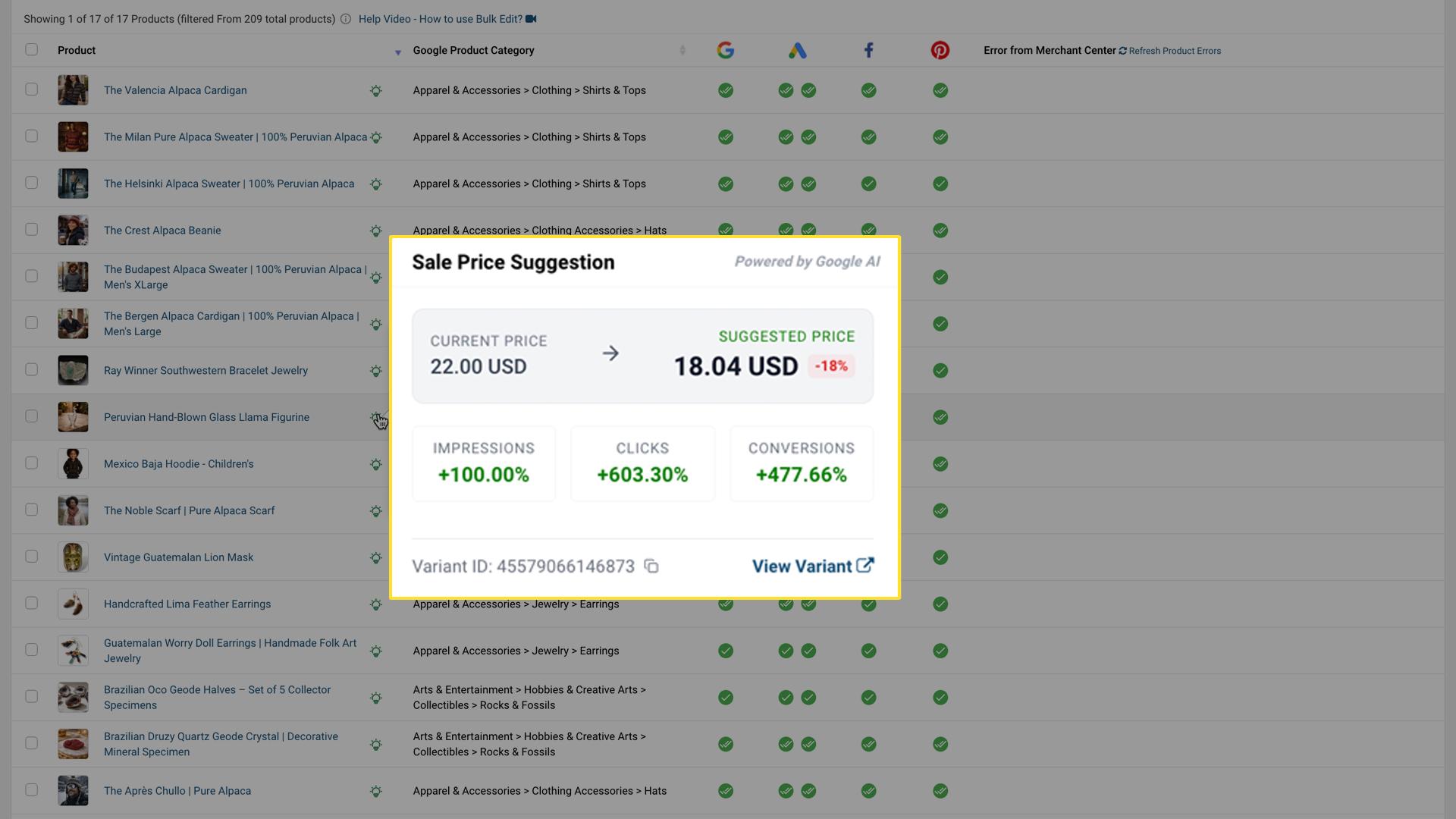
Step 3: Apply the Suggestion (Or Not)
You have full control. Copy the recommended price from the pop-up and update it on your product's detail page in the Shopify Store.
If a suggestion doesn't align with your business goals, simply ignore it. These are recommendations, not requirements.
Step 4: Monitor Performance
After making price changes, give them 2 weeks to take effect. Then check your product performance in Google Merchant Center to see if the actual results match the predictions. This helps you understand how accurate the recommendations are for your business.
Examples
1: The Underperformer
You have a great product that should sell better, but it's getting few clicks. Google suggests lowering the price by 10% to match competitor pricing. You apply it, and within 2 weeks, if you see 20% more clicks and 12% more conversions. The suggestion worked perfectly.
2: The Right Call
Google suggests dropping the price on a product where your profit margin is already thin. You review your COGS and decide the suggested price would make the sale unprofitable. You ignore the suggestion and keep your current price. This is smart business.
3: Seasonal Strategy
During the holiday shopping season, Google notices competitor prices are dropping and suggests a 15% reduction on winter coats. You apply this strategically across your seasonal inventory, attract holiday shoppers, and clear stock while margins are still healthy.
Best Practices: Do's and Don'ts
| Do’s | Dont’s |
| Test on a few products first | Apply all suggestions blindly |
| Check suggestions regularly | Turn off conversion tracking |
| Keep conversion tracking on | Price below your cost |
| Monitor for 2 weeks after changes | Expect guaranteed results |
| Provide GTINs when possible | Ignore your profit margin |
Conclusion
Pricing doesn’t have to be guesswork anymore. With Google’s AI-powered sale price suggestions, you get a clear edge. Use the data, make informed decisions, and keep refining as you go. Optimizing your pricing is now just a click away.
If you still have any queries or concerns, please do not hesitate to reach out to our support team via live chat, or you may write to us at support@simprosys.com
Previous article

Next article
Simprosys Google Shopping Feed
Pre-Installation & Setup
Initial App Configuration
Product Submission Controls
Product Attributes and Optimization
Automated Feed Rules
Troubleshooting & Issue Fixes
Advanced Setup Made Easy
Google Merchant Center Setup
Tracking Tags Setup (Google Ads & Google Analytics 4)
Google Ads & Campaign Setup
Multi-Country & Market Setup
Promotions and Discounts
Microsoft Advertising Integration
Meta (Facebook) Integration
Pinterest Integration