Proviews ‑ Product Reviews Q&A
Legal Policies

Setup & Configuration
Additional Information
Installation Processes
Feature Policies & Guidelines


Coupons for Proviews – Product Reviews Q&A
Jul 24, 2026
Overview
The Review Coupon feature automatically generates and sends unique discount codes to customers after they submit a qualifying review. Use it to reward genuine feedback, increase review volume, and bring customers back for repeat purchases — all without any manual effort.
- Encourages authentic reviews
- Increases customer engagement
- Drives repeat purchases
- Boosts conversions
How It Works

Step 1 – Enable Review Coupons
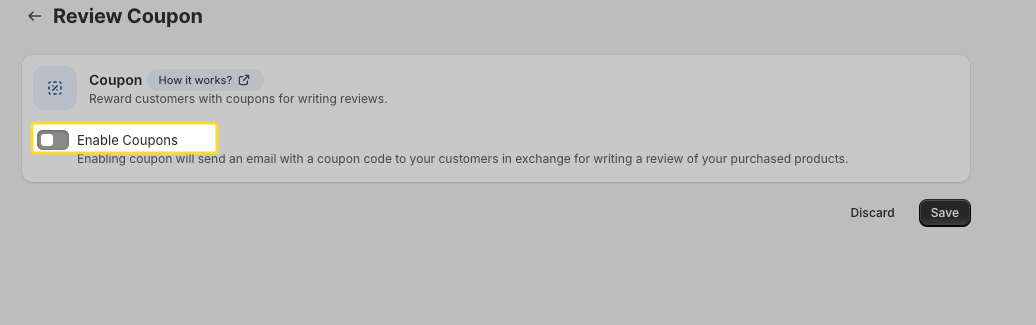
1. Go to Marketing & Social Sharing → Review Coupon.
2. Toggle Enable Coupons to ON. All coupon configuration settings appear immediately.
Step 2 – Set Coupon Limits
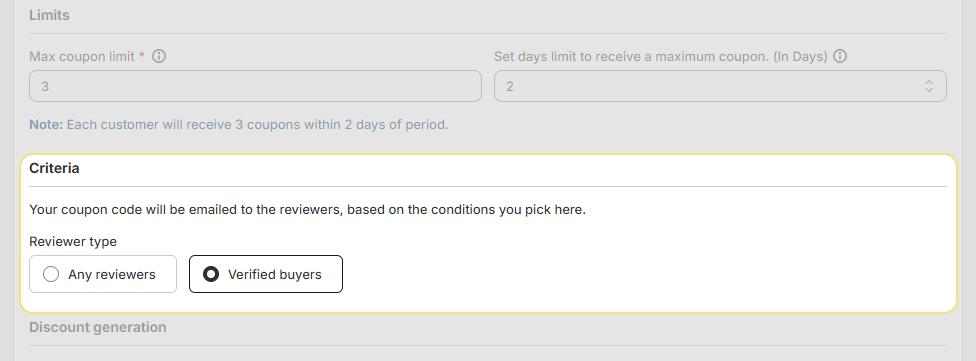
Control how frequently individual customers can receive coupons to prevent abuse:
| Setting | Description | Default / Max | |
| Max Coupon Limit | The maximum number of coupons a single customer can receive within the set time window. | Default: 3 | • Max: 10 |
| Days Limit | The rolling time window in which the coupon limit applies. | Default: 2 days | • Max: 7 days |

Example: With the default settings, a customer can receive up to 3 coupons within any 2-day period — after which no further coupons are sent until the window resets.
Step 3 – Define Eligibility Criteria
Set the conditions a review must meet before a coupon is sent:
Reviewer Type:
Any Reviewer: Any customer who submits a review qualifies — regardless of whether they purchased through the store.
Verified Buyers Only: Only customers who purchased the product and submitted their review via a review request email qualify. Recommended for higher authenticity.
All Reviews: Every submitted review qualifies for a coupon, regardless of whether it includes media.
Reviews with Attachments: Only reviews that include a photo or video qualify. Recommended to encourage visual, high-quality reviews.
Step 4 – Configure the Discount
| Setting | Options & Description |
| Discount Type | Percentage — e.g., 10% off the order total. Fixed Amount — e.g., $10 off. |
| Discount Value | Enter the value matching your selected type. For percentage discounts, the maximum is 100%. |
| Coupon Type | Dynamic (Auto-generated) — Proviews creates a unique, non-reusable code per customer automatically. |
| Coupon Expiry | Set the number of days the coupon remains valid after issue (up to 365 days). Leave blank for no expiry. |
| Redemption Eligibility | Only Reviewers — The coupon can only be used by the customer who received it. Anyone — The coupon can be shared and used by anyone. |
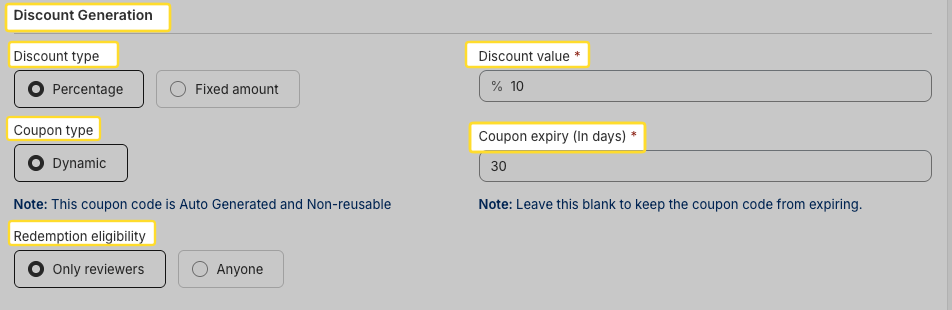
Note: The Only Reviewers redemption option is only available when Verified Buyers is selected as the reviewer type.
Tip: Set a short expiry window of 7–30 days to create urgency and prompt faster repeat purchases.
Step 5 – Customize the Coupon Email
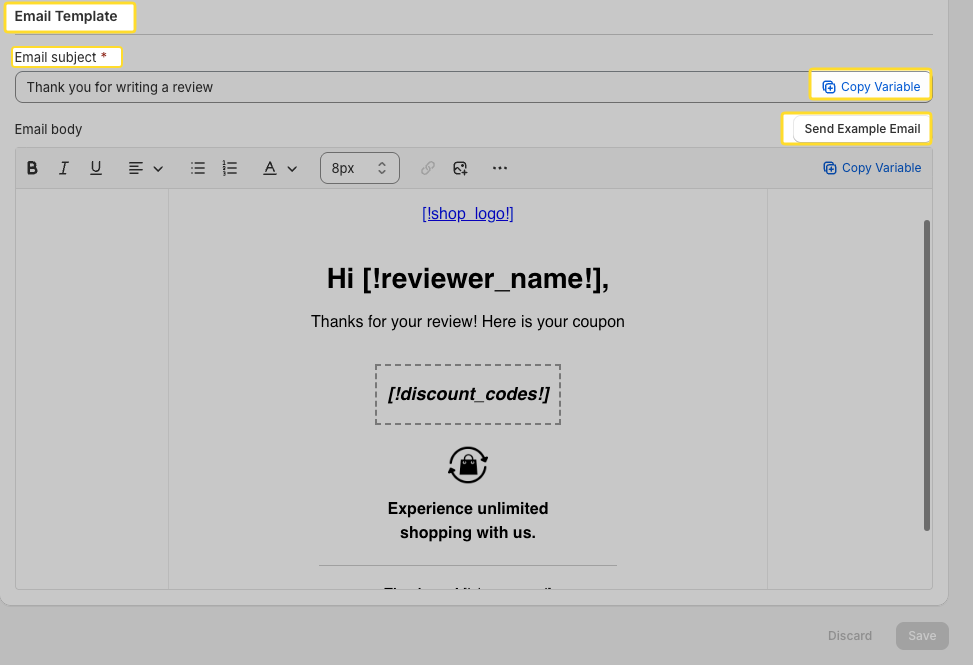
Customize the email Proviews sends to customers with their coupon code:
| Field | Description |
| Email Subject | The subject line customers see in their inbox (e.g., "Thank you for your review — here's a reward!"). |
| Email Body | The email content. Add your logo, branding colors, and a personal message. Use dynamic variables to personalize each email automatically. |
Available Dynamic Variables:
- {{reviewer_name}}
- {{discount_codes}}
Click Send Example Email to preview how the email appears before activating it.
Step 6 – Save Your Settings
Click Save at the bottom of the page to apply all changes. A confirmation message confirms the settings are saved successfully.
Active! Proviews will now automatically generate and send unique coupon codes to customers who meet your configured criteria after submitting a review.
Best Practices
Use Verified Buyers : Restricting coupons to verified buyers rewards genuine customers and maintains review authenticity.
Require attachments : Mandating photo or video reviews generates richer, more persuasive content for your storefront.
Set a minimum rating : Rewarding 4–5 star reviews focuses incentives on positive feedback without discouraging honest responses.
Keep expiry short : A 7–30 day expiry window creates urgency and nudges customers toward a faster repeat purchase.
Need Help?
Click “Help Me” and our chatbot will appear. You can then ask questions or request assistance in real time.
For email support, feel free to reach out to us at support@simprosys.com
Previous article

Next article
Proviews ‑ Product Reviews Q&A
Legal Policies
Setup & Configuration
Additional Information
Installation Processes
Feature Policies & Guidelines