Proviews ‑ Product Reviews Q&A
Legal Policies

Setup & Configuration
Additional Information
Installation Processes
Feature Policies & Guidelines


Proviews Dashboard – Overview & Analytics
Apr 22, 2026
Overview
The Proviews Dashboard gives you an at-a-glance summary of your store's review and Q&A performance. Use it to track customer feedback, monitor moderation status, and measure engagement, all from a single screen without navigating away.
Review Metrics
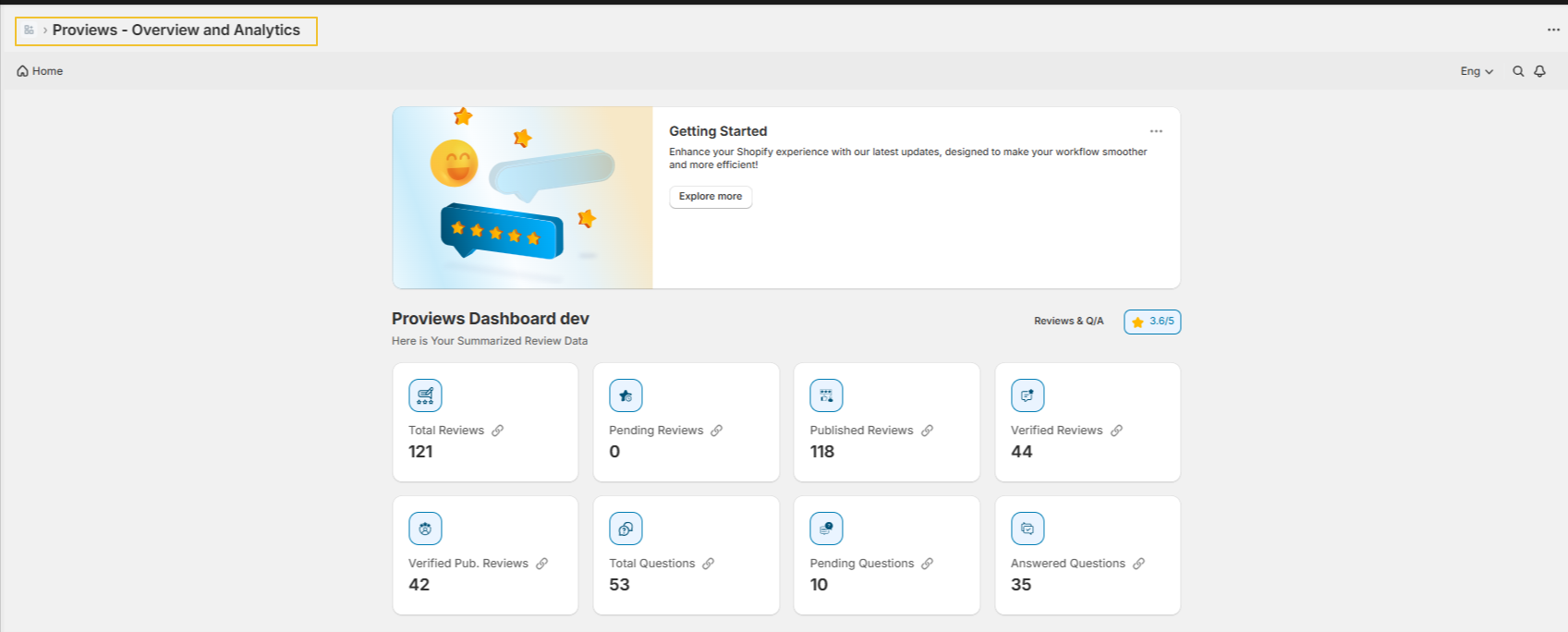
The top section of the dashboard displays six review metric cards. Each card includes a link icon that navigates directly to the detailed view for that metric, use these shortcuts to manage moderation and analyze feedback efficiently.
| Metric | What It Shows |
| Average Rating | The mean star rating across all reviews. Calculated by dividing the sum of all ratings by the total review count (e.g., ratings of 3, 4, 4, 2, 5 across 5 reviews = 3.6 average). |
| Total Reviews | The combined count of all Published, Pending, and Unpublished reviews in your store. |
| Pending Reviews | Reviews submitted via the storefront or email that are awaiting moderation. A review stays pending until you publish or unpublish it. |
| Published Reviews | Reviews you have approved and made live on your storefront. These are visible to shoppers and directly influence purchase decisions. |
| Verified Reviews | Reviews collected from genuine buyers via email review request. Proviews automatically tags these as verified to signal authenticity. |
| Verified Published Reviews | Verified reviews that are also approved and live on your storefront, your most trusted and impactful customer feedback. |
Q&A Metrics
Three metric cards track customer question activity across all products in your store. Each card includes a link icon to navigate directly to the Q&A management view.
| Metric | What It Shows |
| Total Questions | The total number of questions submitted by customers across all products, including both answered and unanswered questions. |
| Pending Questions | Questions that are awaiting a response. These are typically not visible to shoppers until you reply. Responding promptly improves shopper confidence and conversion rates. |
| Answered Questions | Questions that have been responded to and are live on the storefront, helping future shoppers make informed purchase decisions. |
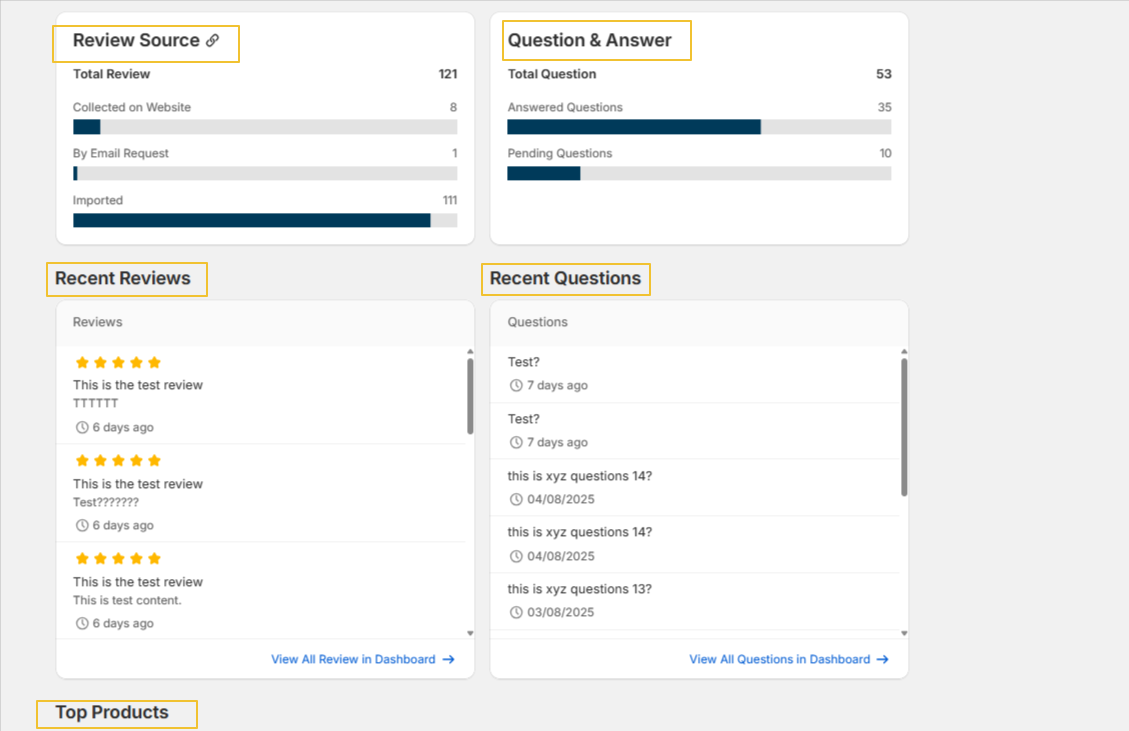
The Q&A Overview panel provides a consolidated summary of all question activity, a quick reference without navigating to the full Q&A management view.
Review Source Panel
The Review Source panel breaks down how your reviews are collected, giving you a clear view of which acquisition channels are most effective.
| Source | Description |
| Total Reviews | The overall count of all reviews available in your store across all sources. |
| Collected on Website | Reviews submitted directly through the review form on your storefront. |
| By Email Request | Reviews collected via automated post-purchase email requests. These reviews are automatically tagged as verified. |
| Imported | Reviews added via CSV or another import method — typically migrated from a previous platform. |
Tip: Use the Review Source breakdown to identify your strongest acquisition channel and focus your efforts where they drive the most reviews.
Recent Reviews & Recent Questions
These two sections give you a live feed of the latest customer activity, so you can act quickly without navigating to the full reviews or Q&A views.
Recent Reviews: Lists the most recently submitted reviews in chronological order, showing star rating, review content, and submission date. Use it to monitor sentiment, spot negative feedback early, and take timely moderation action.
Recent Questions: Lists the latest customer questions along with submission dates. Use it to identify new unanswered questions, respond quickly, and reduce purchase hesitation by keeping product information current.
Top Products
The Top Products section highlights the products receiving the most review activity. Use it to identify your best-performing products and those that may need attention.
| Column | Description |
| Product Name | The name of the product. Click the name to navigate directly to that product's detail view. |
| Reviews | The total number of reviews submitted for that product. |
| Rating | The average star rating calculated from all published reviews for that product. |
Note: Products with a high review count but a low average rating may need attention, consider reviewing recent feedback and responding to concerns to protect your store's credibility.
Need Help?
If you have any questions or need assistance, our support team is happy to help.
Contact us at support@simprosys.com.
Previous article

Next article
Proviews ‑ Product Reviews Q&A
Legal Policies
Setup & Configuration
Additional Information
Installation Processes
Feature Policies & Guidelines