
SearchGro: Search & Filter
Onboarding Process

App Overview
Analytics
Search Widget Configuration
Search Result Page Configuration
Recently Viewed Widget
Color Families
Product Label
Market
Theme Setting
White Glove Setup
Theme Variable
Filter on Collection
Policies


How to Localize (Translate) for the Search Widget in SearchGro
Jan 20, 2026
The SearchGro app for Shopify allows you to customize the language used for various labels and text elements within the Search Widget to cater to a global audience or match your Shopify store's language.
Steps to Localize the Search Widget:
- Log in to your Shopify admin and open the SearchGro app from the Apps menu.
- In the SearchGro dashboard, click the Search tab in the left-hand sidebar.
- From the sub-menu, select Search Widget.
- Click the Localization tab.
In this section, you can translate any product label according to your preferred or native language.
- You’ll see a list of text fields. Each one controls a specific part of the search widget. Here are the labels you can customize:
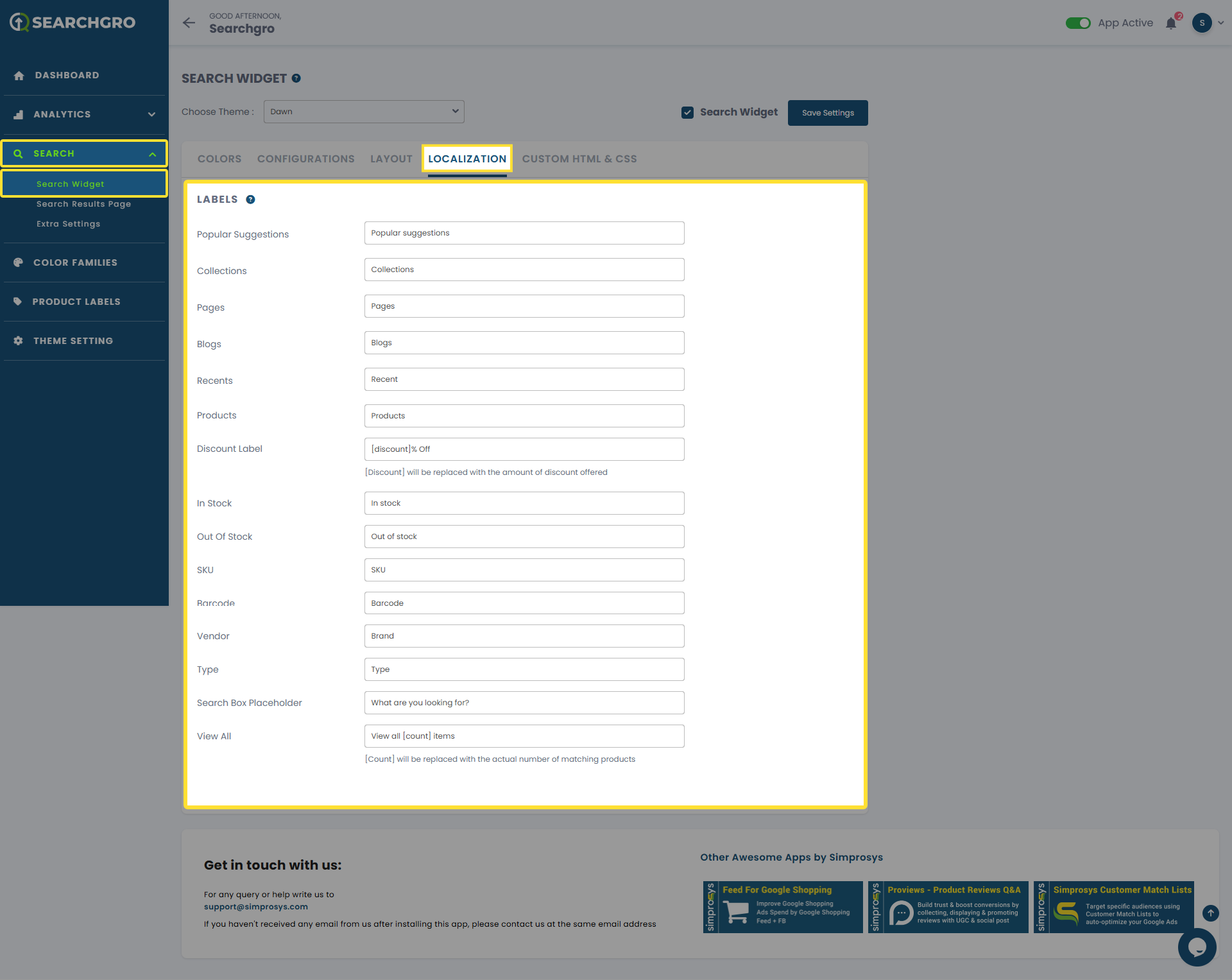
• Popular suggestions
• Collections
• Pages
• Blogs
• Recents
• Products
• Discount Label
• In Stock
• Out Of Stock
• SKU
• Barcode
• Vendor
• Type
• Search Box Placeholder
• View All.
For each field, type your translation (or a custom phrase that fits your store’s voice).
Save your changes
Click the Save button when you’re finished. Your search widget will immediately show the new wording.
Example
If your store is in French, you could change:
- Products → Produits
- In Stock → En stock
- Out of Stock → Rupture de stock
- View All → Voir tout
Now, every customer browsing in your store will see these French terms inside the search widget.
Need help?
Click “Help Me” and our chatbot will appear. You can then ask questions or request assistance in real time.
For email support, feel free to reach out to us at support@simprosys.com
Previous article

Next article
SearchGro: Search & Filter
Onboarding Process
App Overview
Analytics
Search Widget Configuration
Search Result Page Configuration
Recently Viewed Widget
Color Families
Product Label
Market
Theme Setting
White Glove Setup
Theme Variable
Filter on Collection
Policies